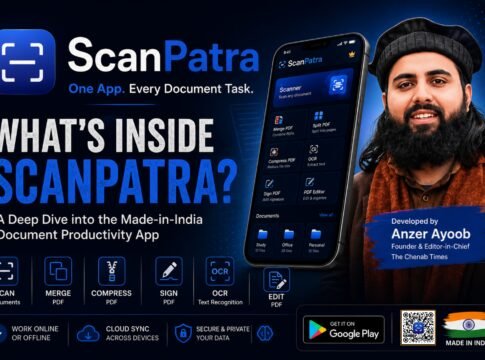
In an era where managing digital documents often requires installing multiple applications, a new Made-in-India solution aims to simplify the entire workflow. ScanPatra, developed by journalist and entrepreneur Anzer Ayoob, Founder and Editor-in-Chief of The Chenab Times, brings together document scanning, PDF management, OCR, document organization, and AI-powered utilities into a single Android application.
Built with a focus on privacy, offline functionality, and ease of use, ScanPatra seeks to eliminate the need for switching between multiple apps for everyday document tasks. Whether users are students, journalists, teachers, government employees, business owners, or professionals, the application provides an extensive suite of tools designed to make document management faster and more efficient.
One App for Every Document Task
Most smartphone users rely on separate applications for scanning documents, editing PDFs, compressing files, extracting text, or organizing important papers. ScanPatra combines these capabilities into one platform, reducing storage consumption and streamlining workflow.
The app is designed around a simple philosophy: one application should handle every essential document task.
High-Quality Document Scanner
At its core, ScanPatra functions as an advanced document scanner.
Users can scan invoices, notes, contracts, certificates, identity documents, books, handwritten notes, forms, receipts, and other paper documents using their smartphone camera.
The scanning engine automatically detects document edges, corrects perspective, removes unwanted background, and produces a clean digital copy suitable for professional use.
Multiple image enhancement filters help improve scan quality under different lighting conditions. These include Original, Enhanced, Black & White, Grayscale, and Vivid modes, allowing users to select the most suitable output depending on the type of document being scanned.
Brightness and contrast adjustments provide additional control before saving or exporting the document.
Multi-Page PDF Creation
Instead of scanning pages individually, ScanPatra allows users to create complete multi-page PDF documents.
Users can continue adding pages during the scanning process, making it suitable for lengthy reports, assignments, official records, agreements, books, and project files.
Each page can be rearranged, rotated, replaced, or deleted before the final PDF is generated.
Powerful PDF Editing Tools
ScanPatra includes several built-in PDF management features that normally require separate applications.
These include:
- Merge multiple PDF files into one document
- Split PDFs into separate pages
- Compress large PDF files
- Rotate pages
- Reorder document pages
- Delete unnecessary pages
- Rename documents
- Organize files into folders
Having these tools within a single application significantly reduces the need for installing dedicated PDF utility apps.
Digital Signature Support
The app enables users to digitally sign PDF documents directly on their smartphones.
Users can draw their signatures using touch input and place them wherever required on a document before exporting the final PDF.
This feature is particularly useful for official paperwork, agreements, applications, declarations, and educational submissions.
OCR: Convert Images into Editable Text
One of ScanPatra’s most practical capabilities is Optical Character Recognition (OCR).
OCR converts printed text from scanned documents or photographs into editable digital text.
Instead of manually typing content from books, notices, circulars, newspaper clippings, or printed forms, users can simply scan the document and extract the text within seconds.
This functionality is especially valuable for journalists, researchers, students, government officials, teachers, and office workers who regularly work with printed material.
AI-Powered Data Extraction
Beyond traditional OCR, ScanPatra also incorporates AI-assisted document analysis.
The app can intelligently identify structured information from certain document types, including receipts and medical prescriptions.
Rather than extracting plain text alone, it can recognise useful details such as merchant names, transaction amounts, dates, doctor names, prescribed medicines, and other relevant information, making records easier to search and manage.
Smart Document Organisation
ScanPatra is designed not only for scanning documents but also for organising them efficiently.
Users can create folders based on categories such as education, office, legal documents, finance, identity records, medical files, or personal notes.
Every scanned document remains stored locally on the device, enabling users to build a digital document library without depending on cloud services.
This structured organisation makes retrieving important files significantly easier.
Intelligent Search
Finding old documents becomes simple through ScanPatra’s built-in search functionality.
The application indexes OCR-generated text, allowing users to search not only by file names but also by words contained inside scanned documents.
Even if a user forgets the document’s title, searching for a keyword within the document often helps locate it instantly.
Letter Maker
One of ScanPatra’s distinctive features is its integrated Letter Maker.
Instead of searching the internet for application formats or official letter templates, users can create professionally formatted documents directly inside the app.
This feature is useful for preparing leave applications, complaint letters, declarations, requests, certificates, office correspondence, and other formal documents.
It can save considerable time for students, employees, and government office visitors who frequently need official documentation.
Offline-First Experience
Unlike many document apps that rely heavily on internet connectivity, ScanPatra is designed with an offline-first approach.
Core features including scanning, editing, PDF generation, organising documents, and several document utilities work without requiring continuous internet access.
This makes the application particularly useful in rural and remote areas where internet connectivity may be unreliable.
Privacy-Focused Design
Privacy has been one of the key design principles behind ScanPatra.
Scanned documents remain stored locally on the user’s device rather than being automatically uploaded to external servers.
For users handling personal records, financial papers, identity documents, educational certificates, or confidential office files, this local-first approach offers greater control over their data.
No Watermarks
Many free document scanner applications place big watermarks on exported PDFs or require premium subscriptions to remove them.
ScanPatra allows users to create professional-looking PDFs without intrusive watermarks, making documents suitable for official and academic use.
User-Friendly Interface
The application follows Google’s Material Design principles with a clean interface intended for users of all age groups.
Navigation remains straightforward, allowing first-time users to scan documents, organise files, and access various PDF tools without a steep learning curve.
The interface is designed to minimise unnecessary complexity while keeping powerful features easily accessible.
Designed for Multiple User Groups
ScanPatra serves a wide range of users, including:
- Students digitising assignments and notes.
- Teachers preparing study material.
- Journalists archiving documents and press releases.
- Government employees managing official paperwork.
- Lawyers handling legal documents.
- Doctors storing prescriptions.
- Business owners managing invoices and receipts.
- Freelancers organising contracts.
- Researchers digitising reference material.
- Everyday smartphone users who simply want a reliable document management application.
Made in India, Built in Chenab Valley
One aspect that distinguishes ScanPatra is its origin.
The application has been independently developed by Anzer Ayoob, Founder and Editor-in-Chief of The Chenab Times, from the Chenab Valley region of Jammu and Kashmir.
The project reflects a growing trend of locally developed technology products addressing practical, everyday digital challenges while contributing to India’s expanding app ecosystem.
The Vision Behind ScanPatra
Rather than competing solely as another document scanner, ScanPatra aims to become a comprehensive document productivity platform.
By combining scanning, PDF editing, OCR, digital signatures, document organisation, AI-assisted extraction, and official letter creation into a single application, it reduces dependence on multiple apps while offering a more streamlined user experience.
As smartphones increasingly become the primary productivity device for millions of Indians, applications that simplify routine tasks continue to gain importance. ScanPatra represents an effort to provide such a solution through a privacy-conscious, offline-first, and feature-rich platform developed entirely in India.
For users looking to replace multiple document-related applications with one integrated solution, ScanPatra presents itself as an all-in-one option designed to handle virtually every stage of document creation, management, and organisation from a single app.
❤️ Support Independent Journalism
Your contribution keeps our reporting free, fearless, and accessible to everyone.
Or make a one-time donation
Secure via Razorpay • 12 monthly payments • Cancel anytime before next cycle


(We don't allow anyone to copy content. For Copyright or Use of Content related questions, visit here.)

The Chenab Times News Desk